Contact Info

 Zoho Inventory
What does a Zoho Inventory consultant do?
A Zoho Inventory consultant configures Zoho Inventory around how a business buys, stores, sells and ships stock: items, warehouses, batch and serial tracking, sales and purchase orders, packing, shipping and sales channels. As an independent Zoho Inventory consultant, I map the order and stock flow first, decide whether Zoho Inventory is deep enough for your operation, then set it up and connect it to Zoho Books, CRM and ecommerce.
Last reviewed by Vikas Saroj
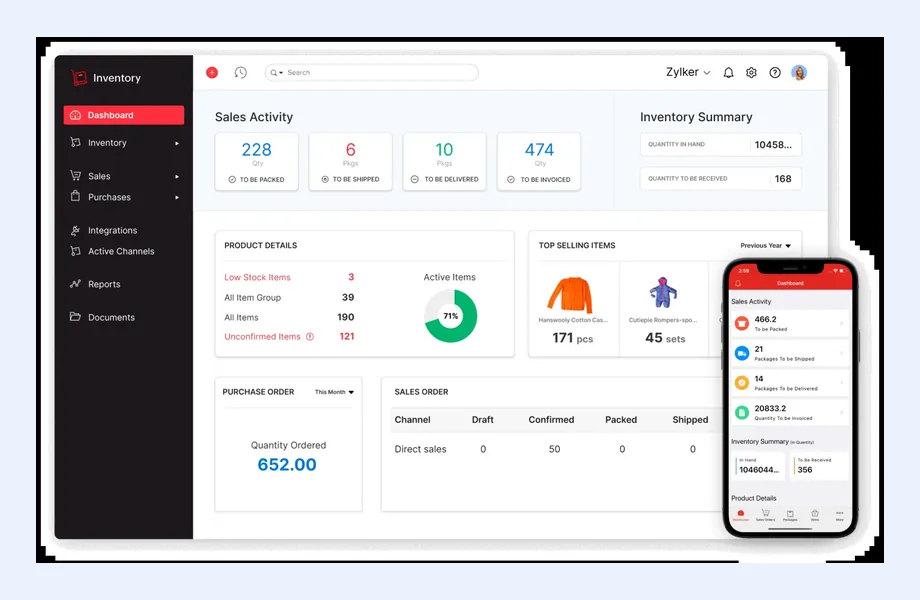
Zoho Inventory is Zoho's inventory and order management app. It handles items, warehouses, purchase and sales orders, packing, shipping and stock tracking, and it shares data with Zoho Books so stock movements and finance stay aligned. For trading, wholesale, distribution and ecommerce businesses, it is often the operational core of a Zoho setup.
Stock problems are rarely software problems first. They come from unclear item masters, units of measure nobody agreed, receiving steps that get skipped and sales channels that each keep their own stock count. As an independent Zoho Inventory consultant, I map how goods actually move through your business before configuring anything.
I work remotely with businesses moving off spreadsheets or an older system, companies adding Zoho Inventory to Zoho Books or Zoho One, and teams whose stock figures no longer match what is on the shelf. I am also honest about where Zoho Inventory stops and a fuller ERP or warehouse system is needed.
 What I Do
I focus on the data and process decisions that decide whether stock figures can be trusted, then configure Zoho Inventory to support them.

Walking through purchasing, receiving, storage, picking, packing, shipping and returns to find where stock data goes wrong and which steps the system must enforce.

SKU rules, item groups and variants, units of measure, composite items and kits, and reorder levels, designed so every channel and report uses the same item data.

Warehouses or locations, transfer orders between them, stock adjustments with reasons and user access per location, matched to how your sites actually operate.

Batch, lot and serial number tracking for products that need traceability, expiry control or warranty handling, set up only where the business genuinely needs it.

Sales orders, backorders, packages, shipments and invoices configured as one flow, with carrier and shipping options where available for your region.

Purchase orders, receiving, vendor bills and reorder alerts that help buyers replenish on time, with dropship and backorder handling where your model uses them.

Ecommerce stores and marketplaces connected so orders flow in and stock levels flow out, using native integrations where available and APIs or Zoho Flow where not.

Zoho Inventory working with Zoho Books for valuation and invoicing, and with Zoho CRM so sales teams see stock and order status without asking the warehouse.
How I Work
Follow the goods and the data
 Warehouse and order walkthroughs
Item and SKU review
Channel and integration list
Stock control requirements
Fit check against ERP needs
Warehouse and order walkthroughs
Item and SKU review
Channel and integration list
Stock control requirements
Fit check against ERP needs
Set up items, sites and flows
Item master cleanup and import
Warehouses and user access
Order and purchase flows
Channel and Books integration
Opening stock count and UAT
Keep stock accurate after go-live
Warehouse and sales training
Cycle count routines
Exception reports
Post-launch adjustments
Zoho Inventory is built for businesses that buy and sell physical goods and need control over stock, orders and fulfilment without the complexity of a large ERP. It is most at home in trading, wholesale, distribution, retail and ecommerce operations.
Zoho Inventory usually fits when:
Look at a fuller ERP or warehouse system when:
For distribution-heavy businesses, the right answer depends on volume and complexity. My distribution and wholesale industry pages describe typical process maps, and the ERP for trading article covers what trading businesses usually need from a system.
Most inventory problems trace back to the item master and to steps people skip on busy days. I spend more time here than on any other part of a Zoho Inventory project.
Item master decisions:
Stock flow rules: purchase orders received against what actually arrived, transfers between warehouses recorded as transfers rather than adjustments, every adjustment carrying a reason, and returns handled through a defined process. Cycle counts on high-value or fast-moving items catch drift before it becomes a year-end surprise.
These rules are documented in a short stock operating procedure that warehouse, sales and finance all sign off. If you are planning broader warehouse improvements, see ERP for inventory and warehousing.
Zoho Inventory rarely runs on its own. Its value comes from being the single stock record that finance, sales and online channels all rely on.
Zoho Books: Inventory and Books share items, contacts, orders and invoices, so stock movements and inventory value appear in finance consistently. The design work is deciding where documents are created, how inventory accounts are set up and how your accountant reviews valuation at month-end.
Zoho CRM: sales teams can see item availability and order status from CRM, and won deals can become sales orders. I decide which app owns customers and items so the two do not drift apart, a pattern explained further on the Zoho One page.
Ecommerce and marketplaces: Zoho Inventory offers integrations with several popular online store platforms and marketplaces, though the list and depth vary by region and change over time. Where a native integration is available and reliable, I use it; where it is not, I use Zoho Flow, a connector or the Zoho Inventory API. In each case I define which system owns prices, stock and product content.
Shipping: carrier and shipping integrations, where available in your country, can generate labels and tracking from packages.
For businesses selling online, my ecommerce page covers the wider process. Integration principles are on the ERP integration page.
A stock migration has one goal: on the first day, the number in the system matches the number on the shelf. Getting there takes planning.
Sales channels need special care during cutover. If an online store keeps selling while stock is migrated, oversells are likely. I plan channel connections to switch on only after opening stock is confirmed. The ERP migration checklist covers the general steps, and my ERP data migration service explains the method in detail.
Zoho Inventory is a solid inventory and order management tool for its target market. These are the boundaries I discuss with clients before they commit.
When these limits matter, I lay out the options side by side. Zoho vs Odoo and best ERP for distribution show how the choices compare.
I am an independent consultant, not a Zoho partner or reseller, and I do not earn anything from the software you choose. That lets me tell you plainly whether Zoho Inventory is enough for your operation, or whether you will outgrow it soon.
Typical engagements:
A common starting point in trading and distribution is stock that lives in spreadsheets, each sales channel has its own count and finance cannot value inventory with confidence. The goal is one stock record that warehouse, sales and finance all trust.
Industries where this matters most include trading, retail and warehousing. If you want an independent view on your inventory setup, get in touch.

Tell me about your business and current systems. I’ll suggest the most sensible first step.
Book a Consultation
Not sure which ERP you need?
Share your business requirements with me and I will help you understand the right process, architecture and platform before implementation.
Platforms
 By Country
Pages written for each market: local tax, e-invoicing, data hosting, migration sources and how the work runs remotely there.
FAQ
Only in a limited way. Composite items let you build kits and simple assemblies from components, which suits light assembly and bundling. Full manufacturing with bills of materials across several levels, routings, work orders, capacity planning and production costing needs a manufacturing ERP. I assess your production process before recommending Zoho Inventory or an alternative.
You need an accounting system, and Zoho Books is the natural partner because the two apps share items, contacts, orders and invoices. Inventory can be used with other accounting software through integrations, but that adds design and maintenance work. If you already use Zoho Books, adding Inventory is usually straightforward.
Often, yes. Zoho Inventory offers native integrations with several online store platforms and marketplaces, though availability varies by region and platform. Where a native option is not available or not reliable enough, I connect channels through Zoho Flow, a connector or the API. The key is defining which system owns stock, prices and product data.
Usually because of process gaps rather than software faults: receiving not recorded against purchase orders, transfers booked as adjustments, unit-of-measure confusion, returns handled informally or channels with separate stock counts. I trace those causes, fix the data with a physical count and introduce controls such as reason codes and cycle counts.
For many distributors, yes, especially with straightforward warehousing and a mix of direct and online sales. If you need advanced warehouse operations, complex costing or manufacturing, a broader ERP may be a better long-term base. I compare the options against your volumes and processes so you choose with your next stage of growth in mind.
Every business is different. Share where you are today and what you want to fix, and I’ll tell you honestly whether and how I can help.
Book a Consultation
Insights
 Book a Consultation
Book a consultation to talk through your processes, systems and goals. I’ll reply with practical next steps - no obligation.