Contact Info
 Warehousing
What does an ERP consultant for warehousing do?
An ERP consultant for warehousing designs how goods are received, put away, stored, picked, packed and counted inside the warehouse, and how that activity is billed or costed. I map your warehouse flows, define requirements for bin locations, barcode scanning, picking strategies and, for 3PL operators, storage and handling billing, then select and implement the right ERP or WMS setup.
Last reviewed by Vikas Saroj
A warehouse is a sequence of physical movements: unload, check, put away, replenish, pick, pack, load and count. Every movement either updates the system at the moment it happens or creates a gap between what the system says and what is on the shelf. Most warehouse problems come from those gaps.
As an independent ERP consultant for warehousing, I work with two kinds of clients: companies running their own warehouse as part of a trading, distribution or eCommerce business, and 3PL operators who store and handle goods for other companies. For both, I map the floor processes, design the location and scanning model, and choose whether the ERP's warehouse features are enough or a dedicated WMS is needed.
For 3PL operators, I also design how storage, handling and value-added services are measured and billed per client.
 What I Do
I help warehouse teams make every physical movement a system transaction, so stock accuracy stops depending on the annual stock take.

I walk through receiving, putaway, replenishment, picking, packing, dispatch and counting with the people who do the work, and record where paper, memory or workarounds replace the system.

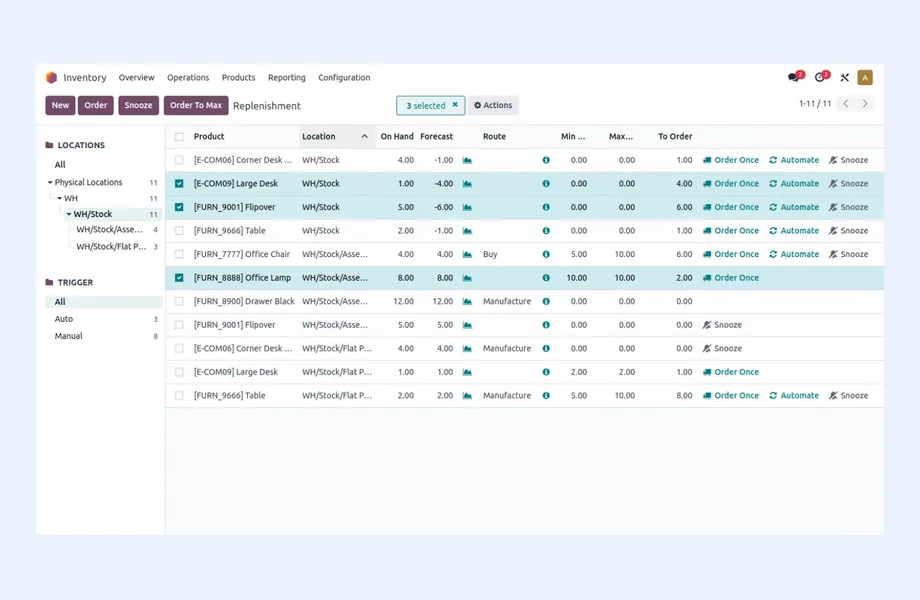
Zones, aisles, racks and bins structured in the system to match the physical layout, with rules for fixed or dynamic locations, bulk and pick faces, and quarantine areas.

Requirements for barcode or mobile scanning at each step, label formats, scanner hardware considerations and what happens when a scan does not match the expected item or location.

Single-order, batch, wave or zone picking chosen to fit your order profile, with pick path logic and packing checks that catch errors before goods leave the dock.

For warehouse service providers: client-owned stock, storage charges by pallet, bin or volume, inbound and outbound handling fees and value-added services captured and invoiced per client.

An independent assessment of whether your ERP's warehouse features are sufficient or a dedicated WMS is justified, with the integration design if a WMS is chosen.
What to Measure
An ERP for warehousing should make these numbers available without a spreadsheet. I design the data model and reports around them from the start.
Platform Fit
How I Work
How goods actually move
 Floor walk-throughs by video
Layout and location review
Order and SKU profile
Current accuracy issues
Floor walk-throughs by video
Layout and location review
Order and SKU profile
Current accuracy issues
Locations, scanning and rules
Warehouse requirements and BRD
Location and labeling model
Picking and counting rules
ERP or WMS fit-gap
Label, test and go live
Location labeling plan
UAT with scanners on floor
Operator training
Accuracy review after go-live
Every warehouse ERP design starts with the physical flow. Written as a process map, a typical warehouse cycle looks like this:
Advance shipping notice -> dock scheduling -> unloading -> receiving against purchase or inbound order -> quality check -> labeling -> putaway to bin -> replenishment from bulk to pick face -> order release -> picking -> packing and verification -> staging -> loading -> dispatch confirmation -> cycle counting.
For a business running its own warehouse, the cycle ends with stock that is available to sell and accurate in the ERP. For a 3PL operator, there is an extra layer: every movement belongs to a client, and many movements are billable. Inbound pallets, storage days, picks, packing materials, labeling and special handling all need to be captured as they happen, or revenue leaks.
Warehouses also differ by profile. A spare parts warehouse may have thousands of slow-moving SKUs and small orders. An eCommerce fulfillment center has high order volumes with one or two lines each. A cold store or pharmaceutical warehouse adds batch, expiry and temperature constraints. I document your profile and every flow through process mapping, often with video walk-throughs of the floor, before choosing any system.
The warehouse operations I review usually show several of these problems:
The common thread is timing: the system has to be updated at the moment of each physical movement. That is a process and scanning design question first, and a software question second.
Whether delivered by the ERP's inventory module or a dedicated WMS, these are the capabilities I usually specify:
| Capability | What it must do in the warehouse |
|---|---|
| Location management | Zones, aisles, racks and bins, with capacity and storage type |
| Receiving and putaway | Receipt against inbound orders, putaway suggestions or rules, labeling |
| Barcode or mobile scanning | Scan-to-confirm at receipt, putaway, pick, pack and count |
| Picking | Single, batch, wave or zone picking with FEFO or FIFO rules |
| Packing and shipping | Pack verification, carton and pallet IDs, carrier labels |
| Cycle counting | Scheduled counts by location or item class, variance approval |
| 3PL client management | Client-owned stock, client-specific rules, activity-based billing |
Many mid-market ERPs now handle bins, scanning and basic picking well enough for a single warehouse with moderate volume. A dedicated WMS earns its place with high order volumes, complex picking optimization, labor management or multi-client 3PL billing. I make that call with you during ERP evaluation, using your order profile rather than a feature list. The broader stock-control view is covered in ERP for inventory and warehousing.
Warehouse go-lives happen on a working floor, often with trucks waiting. Before go-live, I make sure these are ready:
I run UAT on the warehouse floor with real scanners and real operators, not at a desk. Operators find problems that office testers never see, and their early involvement makes training far easier.
Warehouse systems typically connect to the ERP if a separate WMS is used, carrier and shipping platforms, eCommerce channels for fulfillment orders, client systems for 3PL operators through EDI, API or portals, and sometimes automation equipment. I design each integration with a clear owner and error handling through system integration planning.
Migration for a warehouse is mostly about the location master, item master with barcodes and units of measure, and a fresh physical count by bin at cutover. Migrating book stock without a count simply transfers old inaccuracies into the new system.
Odoo, ERPNext, Zoho and Microsoft Dynamics 365 offer very different warehouse depth, from simple multi-warehouse stock to advanced warehouse management; the fit summary on this page gives my view. If your challenge is moving goods between locations rather than handling them inside one, see ERP for logistics and ERP for transportation. Warehouses serving online orders should also read ERP for eCommerce.

Tell me about your business and current systems. I’ll suggest the most sensible first step.
Book a Consultation
Not sure which ERP you need?
Share your business requirements with me and I will help you understand the right process, architecture and platform before implementation.
FAQ
For a single warehouse with moderate volumes, a modern ERP with bins, barcode scanning and basic picking rules is often enough. A dedicated WMS is justified by high order volumes, complex picking, labor management or multi-client 3PL operations. I assess this against your actual order and SKU profile.
By recording every billable event as it happens: inbound receipts, storage by pallet, bin or volume over time, picks, packing, labeling and special handling. The system then applies each client's rate card. I design the billable events and rate structures before choosing or configuring the system.
It depends on your order profile. Many single-line orders suit batch picking; large multi-line orders suit single-order or zone picking; high volumes with cut-off times suit wave picking. I analyze order data and floor layout to recommend a strategy the system can support.
Warehousing focuses on what happens inside the building: receiving, storage, picking, packing and counting. Logistics focuses on moving goods between places and managing shipments, freight costs and partners. Some businesses do both, but the systems and requirements differ.
Every business is different. Share where you are today and what you want to fix, and I’ll tell you honestly whether and how I can help.
Book a Consultation
Insights
 Book a Consultation
Book a consultation to talk through your processes, systems and goals. I’ll reply with practical next steps - no obligation.