Contact Info
 Odoo Manufacturing
What does an Odoo manufacturing consultant do?
An Odoo manufacturing consultant designs how production runs in Odoo: bills of materials, operations and work centers, manufacturing and work orders, material planning, quality checks and product costing. As an independent Odoo manufacturing consultant, I map your plan-to-produce process on paper first, then configure Odoo MRP to match it, and I am clear about where Odoo fits your type of manufacturing and where it needs add-ons or another approach.
Last reviewed by Vikas Saroj
Odoo Manufacturing connects production to sales, purchasing, inventory and accounting in one system. A sales order can trigger a manufacturing order, components can be purchased or produced automatically, and finished goods carry their cost into the ledger. When it is set up well, planners, buyers and finance finally work from the same data.
As an independent Odoo manufacturing consultant, I start with how you actually produce: make-to-stock or make-to-order, how deep your bills of materials go, which operations happen at which work centers, how you subcontract, and where quality is checked. Then I decide how much of Odoo MRP you need and how detailed it should be.
I work remotely with discrete, assembly and light process manufacturers worldwide, and I am honest when a requirement such as advanced finite scheduling or complex process manufacturing is better handled with an add-on or a different platform.
 What I Do
I design Odoo Manufacturing at the level of detail your shop floor can sustain, linked to inventory, purchasing and costing.

Workshops with production, planning, purchasing and finance to document how demand becomes production, where materials come from, and where today's process breaks down, before any BoM is entered.

Multi-level BoMs, kits, phantom assemblies, by-products and variant-specific components structured so planners can maintain them and costing stays accurate as products change.

Work centers with capacity, efficiency and cost rates, and operations on the BoM that define what happens where, kept as simple as your reporting genuinely requires.

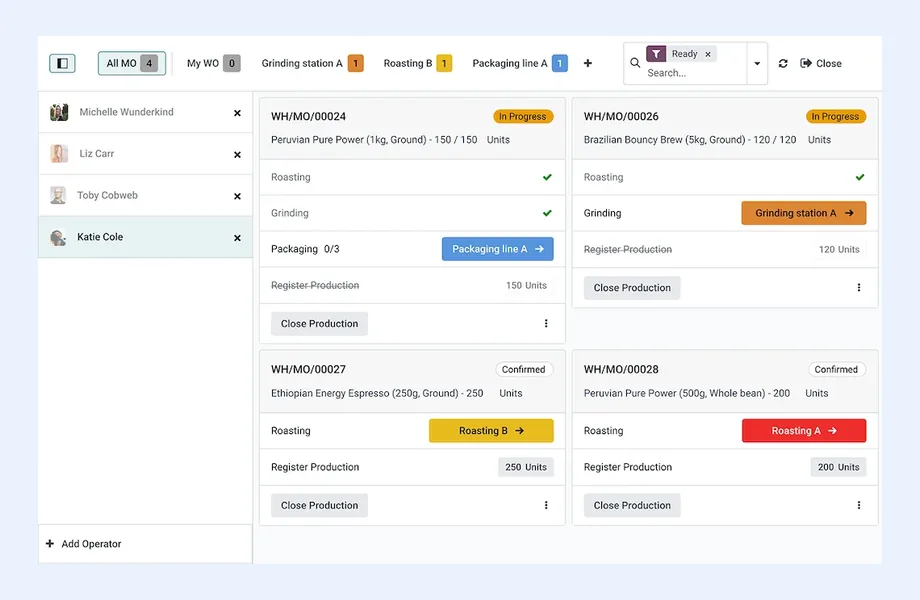
Manufacturing orders broken into work orders, with time recording, component consumption and operator instructions. Shop floor tablet views depend on edition, so I check before planning around them.

Reordering rules, make-to-order routes, lead times and the replenishment view configured so component purchasing and sub-assembly production follow demand, not guesswork.

Subcontracting BoMs, components sent to the subcontractor, receipts of finished goods and correct cost capture, so outsourced operations are visible in stock and in margins.

Quality control points at receipt or during production and equipment maintenance plans. Quality is an Enterprise app; I confirm edition fit before designing inspection flows.

Component, labor and overhead costs captured through BoMs and work center rates, cost analysis per manufacturing order and valuation rules agreed with finance.
How I Work
Understand production before configuring
 Plan-to-produce workshops
BoM and routing review
Manufacturing type fit check
Costing approach with finance
Edition and add-on needs
Plan-to-produce workshops
BoM and routing review
Manufacturing type fit check
Costing approach with finance
Edition and add-on needs
Configure and prove with pilots
BoMs and work centers
Routes and reordering rules
Pilot production runs
Costing reconciliation tests
Go live line by line
Phased product rollout
Planner and operator training
Daily production review
Improvement backlog agreed
Odoo Manufacturing works best for discrete and assembly manufacturers that want production tightly connected to sales, purchasing, inventory and accounting without stitching several systems together. Typical good fits are equipment and component makers, furniture, electronics assembly, light engineering, private-label production and make-to-order workshops.
It usually fits well when:
Think carefully when:
For a neutral view, see ERPNext vs Odoo for manufacturing, best ERP for manufacturing and my manufacturing industry page.
The bill of materials is the foundation of Odoo Manufacturing, and the most common source of trouble. A BoM that is incomplete, out of date or modeled at the wrong level breaks planning, costing and stock at the same time.
The design decisions I work through:
On the shop floor, operators can record work order progress, time and component consumption. Odoo offers a tablet-oriented shop floor interface, but which version is available depends on edition, so I check that before you buy hardware. I also design BoM change control, which Odoo supports through its PLM app with engineering change orders in Enterprise, or through a documented manual process in Community.
Material requirements planning in Odoo is driven by demand and replenishment rules rather than a single overnight batch run. Understanding that difference is important for planners coming from traditional MRP systems.
I usually start with a smaller set of well-maintained rules and grow from there. Too many automated rules on poor master data produce a flood of orders nobody trusts. Planning also depends heavily on the inventory routes behind it, so I design the two together and test them with real demand scenarios before go-live.
Beyond producing goods, manufacturers need to control quality, keep equipment running and know what a product actually costs.
Quality: the Odoo Quality app, which is Enterprise, lets you define control points on receipts, specific operations or deliveries, with pass-fail, measurement or instruction-type checks, quality alerts and traceability back to lots. In Community, inspection is usually handled with a quality step in multi-step receipts plus documented procedures, or third-party modules.
Maintenance: equipment records, preventive maintenance and corrective requests can be linked to work centers, so planners see when a machine is unavailable. I check the edition for the specific scheduling features you need.
Costing: production cost in Odoo combines component costs from the BoM, labor or machine time through work center cost rates, and any overhead built into those rates. Finished goods are valued according to the product category's costing method. With finance, I agree:
Costing is the area where business decisions matter more than configuration, which is why I treat it as part of solution design, not a technical setting.
Moving production into Odoo means migrating more than stock. Products, units of measure, BoMs, work centers, routings, open manufacturing and purchase orders, and opening stock and value all need to be cleaned and loaded. BoMs are the hardest part; many companies discover that their BoMs only existed in people's heads or in outdated spreadsheets. I plan BoM validation as a project task with production owners, then run pilot production orders before cutover. I also recommend going live product family by product family where the business allows it.
Honest limitations to plan for:
As a freelance Odoo consultant, I have no stake in which platform you choose. I can assess whether Odoo MRP fits your production model, design it with your team, coordinate an implementer, or help recover a manufacturing rollout that has stalled. See also Odoo consulting and Odoo vs Dynamics 365.

Tell me about your business and current systems. I’ll suggest the most sensible first step.
Book a Consultation
Not sure which ERP you need?
Share your business requirements with me and I will help you understand the right process, architecture and platform before implementation.
Platforms
 By Country
Pages written for each market: local tax, e-invoicing, data hosting, migration sources and how the work runs remotely there.
FAQ
The core Manufacturing app with bills of materials, manufacturing orders, work centers and work orders is available in Community. Several related tools, including Quality, PLM with engineering change orders and the Master Production Schedule, are Enterprise. Feature boundaries change between versions, so I check your edition against your requirements before you decide.
Yes. Routes and reordering rules can be set per product, so some items are produced against specific sales orders while others are produced to keep stock levels. The design challenge is choosing the right setting for each product and sub-assembly and keeping lead times realistic, which I work through with your planners.
Odoo schedules work orders against work center availability and capacity, which is enough for many discrete manufacturers. It is not a full advanced planning and scheduling system with sequence optimization. If detailed finite scheduling is critical, I assess whether an add-on or a dedicated planning tool integrated with Odoo is the better route.
It can be, with care. Lot tracking, expiry dates and quality checks help, but formula-based production, potency, catch weights and strict regulatory validation may need add-ons, custom work or a different platform. I assess these specific requirements during fit-gap analysis rather than assuming standard Odoo covers them.
Odoo combines component costs from the bill of materials with labor or machine costs from work center rates, then values finished goods using the product category's costing method. I agree with finance which costs to include, how rates are set and how variances are reviewed, then test it with pilot production orders.
Every business is different. Share where you are today and what you want to fix, and I’ll tell you honestly whether and how I can help.
Book a Consultation
Insights
 Book a Consultation
Book a consultation to talk through your processes, systems and goals. I’ll reply with practical next steps - no obligation.