Contact Info

 Odoo CRM in the UK
What does an Odoo CRM consultant do for a UK business?
For a British company, an Odoo CRM consultant shapes the pipeline so that a won opportunity becomes a quotation with the right VAT treatment for a UK, EU or rest-of-world buyer, then a sales order, delivery and invoice in the same system. The work also covers trade account applications, sterling and euro price lists, field rep visits, matching companies by VAT and Companies House numbers, and whether another CRM should stay.
Last reviewed by Vikas Saroj
A typical British Odoo customer is a wholesaler, an engineering supplier or a brand selling to trade accounts at home and in Europe. Sales staff live in email and on the phone, a few reps visit stockists, and the office turns orders into deliveries. Until the CRM is part of that chain, the pipeline report and the order book never quite agree.
I work remotely with UK businesses to set up Odoo CRM as the front end of their sales process: how an inquiry becomes a trade account, how quotes pick up the correct VAT and currency, and how a confirmed order flows into stock and invoicing without someone rekeying it.
My role is independent. I hold no reseller agreement with Odoo and earn nothing from implementers, so I can also tell you when keeping a separate CRM is the better call, or when the problem is the sales process rather than the software.
 What I Do
These are the areas where UK Odoo CRM setups most often need deliberate design rather than default settings.

A defined route from first inquiry to an approved trade account: application details, credit check outcome, payment terms, and the point at which a prospect is allowed to order on account rather than pro forma.

Fiscal positions that switch tax treatment for domestic, EU and export customers, plus domestic reverse charge cases where they apply, so quotes and invoices match what your accountant expects.

Separate price lists for sterling, euro and dollar customers, with rounding, discount tiers and validity dates that sales managers can maintain without touching product records.

Activity types for stockist visits and site meetings, mobile logging after each call, and manager views showing which key accounts have gone quiet for too long.

VAT registration and Companies House numbers stored on customer companies and used to detect duplicates before a new account is created or an import is run.

Where Salesforce or HubSpot remains, a written ownership model for leads, accounts and orders, and a tested sync so Odoo holds operational truth and the CRM keeps its role.
How I Work
How inquiries really become orders
 Inquiry channels and volumes
Trade account approval steps
VAT cases with accountant
Rep territory and visit pattern
Inquiry channels and volumes
Trade account approval steps
VAT cases with accountant
Rep territory and visit pattern
CRM, Sales and pricing together
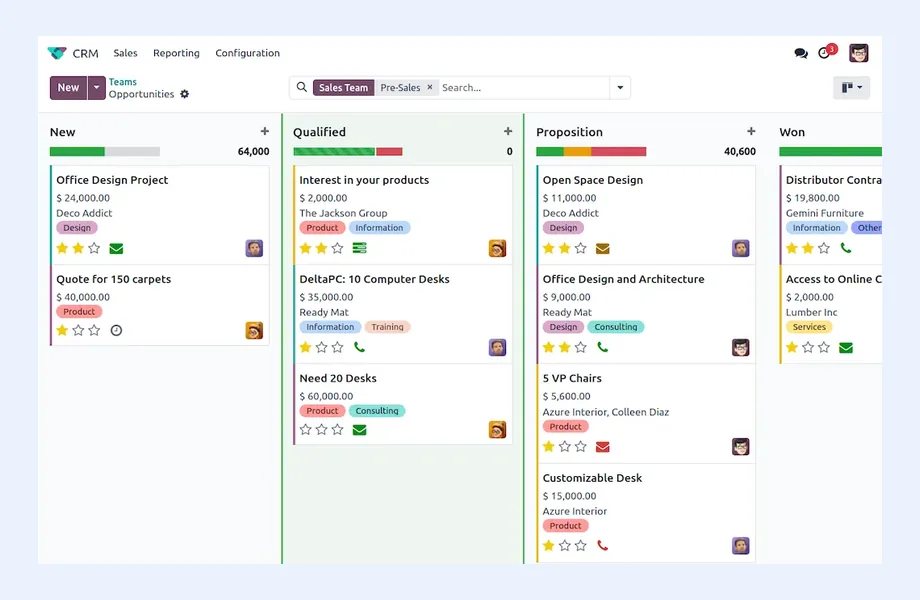
Stages with entry rules
Fiscal positions by customer type
Currency price lists
Duplicate checks on VAT number
Make the pipeline trusted
Training by role
Pipeline and visit reports
Data quality owner named
Review after first month-end
When a British firm sells only to domestic businesses, VAT on a quote is simple. Most Odoo users I meet in the UK are not that firm. They sell to UK trade customers, ship goods to buyers in the EU, export further afield, and sometimes supply construction services caught by the domestic reverse charge. Each of those needs a different tax outcome on otherwise identical lines.
In Odoo, the customer record decides much of this. A fiscal position on the customer, or one selected automatically by country, maps the default VAT to the correct treatment before the quotation is printed. I build those mappings from a scenario list your accountant signs off:
Tax treatment is for your accountant or tax advisor to confirm. My work is making sure the quote a rep sends from Odoo CRM matches the invoice finance later posts. The ledger side is covered on the Odoo Accounting UK page.
UK wholesale and trade supply runs on accounts. A new customer usually starts on pro forma, completes an application, passes a credit check and then gets terms. In many companies that process lives in email attachments, and nobody in sales knows whether a prospect can order on account yet.
Odoo CRM can hold that journey if it is designed as part of the pipeline:
The benefit is practical. A rep can see why an order is held, finance can see which prospects are close to ordering, and the first invoice goes to the correct legal entity rather than a trading name copied from an email signature.
Lead capture in UK Odoo projects tends to follow a familiar mix. LinkedIn outreach and paid search bring in new prospects, trade exhibitions produce a burst of contacts each season, existing stockists reorder by email, and field reps cover regions from the South East to Scotland visiting customers in person.
What I configure for each:
Odoo's mobile experience is workable for this, but test it on your reps' phones and on patchy rural signal before training, and check whether features such as VoIP or certain apps sit in Enterprise for your version.
UK subsidiaries of larger groups often inherit Salesforce, and marketing-led firms frequently run HubSpot. Moving them onto Odoo CRM simply because Odoo is the ERP is not automatically right. I recommend keeping the existing CRM when group reporting depends on it, when marketing automation is central, or when a CRM team already maintains it well.
When both systems stay, I write down the ownership before any connector is chosen:
Integration options range from ready-made connectors to middleware or custom API work. Each has different field coverage and support implications, which I test against real deals. See ERP integration for the method.
Odoo Community includes the CRM app with pipelines, activities and lead management. Features that UK sales teams often expect, including VoIP, Studio customization, lead enrichment and some automation, may need Enterprise or paid credits. Because feature lists shift between versions, I check your edition against the requirements before configuration starts, not during testing.
Odoo CRM is a weaker choice for a British business when:
For the broader platform picture, read my Odoo consultant UK page and the general Odoo CRM overview. My CRM consulting page explains the approach, the ERP consultant UK page covers system selection, and the UK hub lists everything I do for British clients, remotely and within UK working hours.

Tell me about your business and current systems. I’ll suggest the most sensible first step.
Book a Consultation
Not sure which ERP you need?
Share your business requirements with me and I will help you understand the right process, architecture and platform before implementation.
FAQ
Yes. Fiscal positions on the customer, or applied automatically by country, change the VAT on a quotation before it is sent. The mappings need to reflect the scenarios your accountant has confirmed, including EU goods sales, exports and reverse charge cases, and they should be tested with real customers before go-live.
Store the VAT registration number and Companies House number on customer companies, make one of them mandatory for trade accounts, and check imports against them. Odoo can show similar records, and more complete duplicate rules depend on edition. A named data owner who merges records regularly is still essential.
Yes, if onboarding is designed into the CRM. I add onboarding stages, show payment terms and credit status on the customer, and use down payment invoices for pro forma customers, so reps know whether an order can go on account without asking finance.
Yes. I work remotely with businesses across the United Kingdom, with workshops scheduled in UK business hours and recorded training for reps on the road who cannot join live sessions. An in-person session can be discussed by arrangement where it genuinely helps the project.
Every business is different. Share where you are today and what you want to fix, and I’ll tell you honestly whether and how I can help.
Book a Consultation
Insights
 Book a Consultation
Book a consultation to talk through your processes, systems and goals. I’ll reply with practical next steps - no obligation.