
Contact Info

 ERPNext Accounting in the Netherlands
What does a Dutch company need to add to ERPNext Accounting?
ERPNext Accounting supplies the ledger, taxes, banking, multi-company and multi-currency, but a Dutch B.V. usually needs more: a chart mapped to the reference scheme its accountant uses, BTW templates and ICP figures, CAMT statement imports, an auditfile export built as custom work and a Peppol access point integration. I specify and test those pieces remotely and confirm app availability for your version with Frappe or your partner.
Last reviewed by Vikas Saroj
Dutch accountants and bookkeeping firms tend to have firm views on how data should reach them: a chart they can map, a BTW overview they can tick off and a file they can load into their own tools. A B.V. moving its ledger into ERPNext has to meet those expectations, or month-end slides back into spreadsheets and emailed exports.
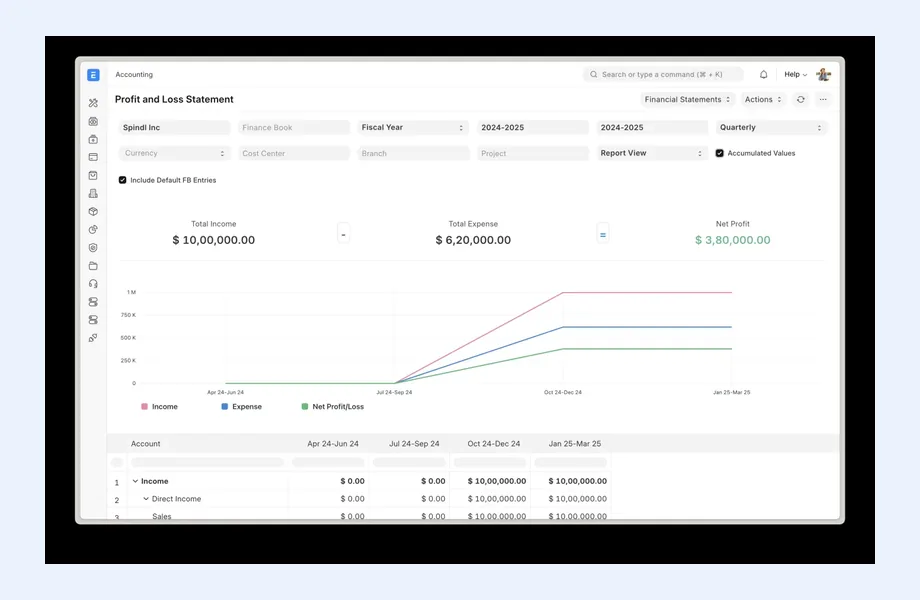
ERPNext covers the accounting core well, with the advantage that sales, purchasing and stock post into the same ledger. The Dutch-specific pieces, from reference chart codes to the auditfile and Peppol, are a mix of configuration, community apps and custom work. I work remotely and independently to decide which is which, write the specification and test the result with your accountant. I am not a Frappe partner and take no commissions.
 What I Do
The aim is a ledger your accountant can work with directly, without a translation step every quarter.

Your chart of accounts imported into ERPNext with a reference code on each account where your accountant works with the Dutch reference scheme, so their tools can read the ledger without manual regrouping.

Tax templates, item tax templates and tax rules for domestic rates, intra-EU supplies, imports and reverse charge cases your advisor names, plus a saved report gathering the figures for the BTW return and ICP listing.

A written specification for an auditfile export built as custom work or taken from a maintained app, tested by loading the file into your accountant's software before it is trusted.

Statement imports for Dutch bank accounts and payment provider settlements, with matching rules so webshop payouts, fees and refunds reconcile against the correct invoices and clearing accounts.

A comparison of app, provider API and custom integration options for sending and receiving Peppol invoices, with identifiers, error handling, upgrade testing and a named maintainer written down.

Holding and operating B.V.s set up as separate companies on one site, with inter-company invoices, management fee postings and a clear agreement on where consolidation and fiscal group questions are handled.
How I Work
What the accountant needs to receive
 Accountant interview and file formats
BTW cases listed
Bank and provider accounts mapped
Custom work separated from configuration
Accountant interview and file formats
BTW cases listed
Bank and provider accounts mapped
Custom work separated from configuration
Configuration, apps and custom work
Chart with reference codes loaded
BTW test documents posted
Auditfile loaded by accountant
Peppol round trip tested
Live periods and upgrades
First BTW period reviewed
Reconciliation rules tuned
Upgrade regression pack handed over
Maintainers named per app
Dutch accountants can work with a standard reference chart, known as RGS, which lets their software and reporting tools read different clients' ledgers in the same way. ERPNext has no built-in awareness of that scheme, but its chart of accounts can be imported from a spreadsheet and extended with a custom field holding the reference code for each account. Whether you need this at all is a question for your accountant, and I ask it in the first session.
If the answer is yes, the mapping is done account by account, with the accountant reviewing the result. Account types still matter inside ERPNext, because receivable, payable, bank, tax and stock types drive its own reports. Cost centers and accounting dimensions then carry the management view: per branch, per sales channel or per product group, depending on what your directors actually ask about each month.
Getting this right early saves trouble later. Accounts renamed or restructured after go-live break both the mapping and comparisons with earlier periods, so I freeze the chart before opening balances are loaded and record who may change it. The general features of the module are on my ERPNext Accounting page, and the platform decision itself is covered on ERPNext for Dutch companies.
In ERPNext, BTW is configured through sales and purchase tax templates, item tax templates for goods with a different rate, and tax rules that pick a template based on the customer or supplier. A Dutch trading or manufacturing B.V. typically needs cases for domestic sales, goods sent to VAT-registered buyers elsewhere in the EU, services supplied across borders, purchases from EU suppliers, imports and domestic reverse charge situations. Your advisor names the cases; I make the system apply them consistently.
The figures then have to come out again. I build saved reports that total net amounts and tax per return category, and a separate report that lists intra-EU supplies by customer VAT number for the ICP listing. Both are compared against a manual calculation for a sample period before the first live filing. If an import VAT deferment arrangement or fiscal representation applies to you, the rule comes from your advisor and I make sure ERPNext records the data it needs.
Data quality decides whether the rules work. Customers need a country, a VAT number and the right tax category, so I include a clean-up of customer and supplier records in the plan. Filing itself stays with your accountant or finance team; ERPNext prepares, it does not submit. For a comparison with a packaged Dutch localization, see Odoo Accounting in the Netherlands.
Dutch banks provide statements in structured formats such as CAMT, and ERPNext's statement import works from downloaded files mapped to bank transactions. Whether your version reads your bank's structured format directly, or a community app or small script is needed, should be confirmed with Frappe or your partner and tested with real files. The bank reconciliation tool then proposes matches, and I tune rules for recurring lines so finance staff review exceptions rather than every row.
Webshop businesses add a layer. Card and local payment methods arrive as settlement payouts from a payment service provider, net of fees and refunds. I design a clearing account per provider, an import of the settlement report and matching rules that split each payout into receipts, fees and refunds. Without this, the bank line never matches anything and the receivables ledger drifts.
The auditfile is the other Dutch expectation. Accountants and the tax authority can ask for a standard export of the financial administration, and ERPNext does not produce it out of the box as far as I can confirm, so treat it as custom work or a maintained app. I write a specification, have it built by your developer or partner and ask your accountant to load a test file into their software before sign-off. The ERP integration page explains how I manage this kind of build.
Dutch public sector buyers generally expect structured electronic invoices, and the wider EU direction points toward more e-invoicing between businesses. Your tax advisor should tell you which obligations reach your company and on what timetable. For ERPNext the practical question is how invoices travel: ERPNext does not include a Peppol connection in its core, so it is normally added through an app or an integration with a Peppol access point provider.
I compare the routes on the points that matter after go-live. Who maintains the connector when ERPNext is upgraded? How do rejected invoices come back, and who sees the error? Can incoming supplier invoices become draft purchase invoices that someone approves and matches to an order? Does the provider handle the identifiers your buyers publish, such as chamber of commerce or VAT based identifiers? The answers go into a short comparison with a recommendation, and the access point contract stays between you and the provider.
Testing uses real counterparties: a sales invoice and a credit note sent to a customer who receives Peppol, a supplier invoice received and posted, and a rejection handled end to end. Master data is checked so every relevant customer has a valid identifier. I then add the Peppol flow to the upgrade regression pack, because a silent failure here means invoices that never arrive. My system integration page shows the specification format I use.
A common Dutch structure puts a holding B.V. above one or more operating B.V.s. ERPNext can host each as a separate company on one site, with its own ledger and taxes, and inter-company invoices for management fees or recharges. Fiscal unity and consolidation questions belong to your accountant; ERPNext's group reporting is lighter than specialist tools, so we agree where consolidated figures are produced. The design questions are set out under multi-company ERP.
Hosting and upgrades need the same care. Frappe Cloud handles routine server work, self-hosting with a European provider gives control over location and timing, and a partner can run it under contract. Record the data location in your GDPR file. Before every major upgrade, a copy of the site should rerun the BTW test documents, a bank import, the auditfile export and the Peppol round trip, and each custom app needs a named maintainer.
ERPNext Accounting is not the best answer for every Dutch company. If your bookkeeping firm will only work in its own package, if Peppol must be live soon with nobody to build the route, or if several foreign subsidiaries need consolidation, a packaged option such as Zoho Books in the Netherlands or a larger suite may fit better. My ERP consultant page for the Netherlands and the Netherlands hub describe how I approach that choice.

Tell me about your business and current systems. I’ll suggest the most sensible first step.
Book a Consultation
Not sure which ERP you need?
Share your business requirements with me and I will help you understand the right process, architecture and platform before implementation.
FAQ
Not as a built-in feature, as far as I can confirm. ERPNext lets you import your own chart of accounts and add a custom field for the reference code on each account. Your accountant decides whether the mapping is needed, and I check the result with them before opening balances are loaded.
Treat it as custom work unless Frappe or your partner confirms a maintained app for your version. I write a specification for the export, have your developer or partner build it, and ask your accountant to load a test file into their own software before it is accepted.
Peppol is not part of the ERPNext core, so sending needs either an app or a connection to an access point provider's API. I compare available routes on maintenance, error handling and incoming invoice processing, then test a full round trip with real customers and suppliers before you rely on it.
It can prepare the figures. With correctly configured tax templates and clean customer data, saved reports can total each return category and list intra-EU supplies by VAT number. The filing itself stays with your accountant or finance team, who should review a sample period first.
Every business is different. Share where you are today and what you want to fix, and I’ll tell you honestly whether and how I can help.
Book a Consultation
Insights
 Book a Consultation
Book a consultation to talk through your processes, systems and goals. I’ll reply with practical next steps - no obligation.


