
Contact Info

 Finance Automation
What is ERP finance automation?
ERP finance automation means letting the ERP handle repetitive finance work that people currently do by hand: posting invoices from orders, matching bills to purchase orders and receipts, reconciling bank lines, chasing overdue payments and preparing recurring journals. The aim is a faster, more reliable close and fewer spreadsheet adjustments. I help finance teams find which tasks to automate first and design the controls around them.
Last reviewed by Vikas Saroj
Many finance teams already have an ERP or accounting system, yet month-end still means exporting data, matching lines in spreadsheets and posting adjustments by hand. The system records transactions, but the work around those transactions is still manual. That is where time disappears and errors creep in.
Finance automation is not about adding a bot on top of a messy process. It starts with understanding why the manual steps exist: missing data upstream, unclear approval rules, or a chart of accounts that does not match how the business reports. Fix those causes and much of the automation becomes standard ERP configuration.
I look at finance automation as an independent consultant, which means I recommend the smallest change that removes the manual work, whether that is a process fix, configuration, an add-on or a new system. The goal is a close that is shorter, calmer and easier to audit.
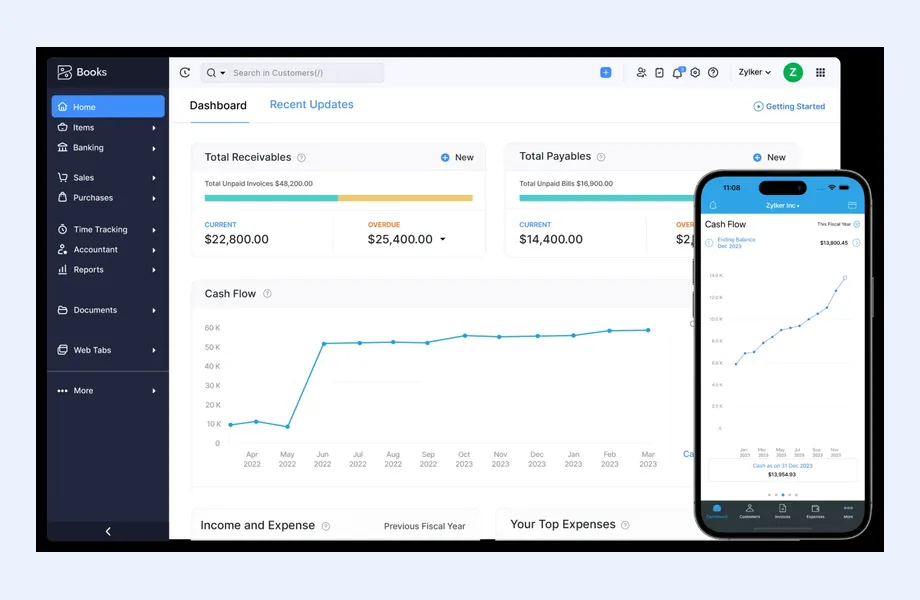
 What I Fix
These are the areas where manual finance work usually concentrates, and where automation pays back soonest.

Making sure sales invoices are generated from delivered orders and supplier bills from received goods, so finance reviews the exceptions instead of keying and checking every single document by hand.

Configuring purchase order, goods receipt and supplier bill matching with tolerance rules, so only mismatches reach a person and approved bills flow straight to payment runs.

Setting up bank feeds or statement imports with matching rules for recurring payments, fees and customer receipts, so reconciliation becomes review rather than data entry.

Automated statements, payment reminders and credit hold rules tied to customer terms, so overdue invoices are chased consistently without relying on someone remembering to send emails.

Templates and schedules for prepayments, accruals, depreciation and intercompany charges, replacing the spreadsheet journals that someone rebuilds by hand every month and that nobody else can check or explain.

Approval routes for purchases, payments and journals based on amount, cost center or supplier, with an audit trail that satisfies auditors and leaves segregation of duties intact.
How It Runs
See where finance time actually goes
 Close calendar walkthrough
Manual task inventory
Upstream data issues
Control and audit needs
Close calendar walkthrough
Manual task inventory
Upstream data issues
Control and audit needs
Choose the right fix per task
Process changes first
Configuration and matching rules
Add-ons only where needed
Approval and control design
Automate, test and embed
Configure and test scenarios
Parallel run with finance
Close checklist update
Ownership and monitoring
The need for ERP finance automation usually shows up in the close calendar before anyone names it. Common symptoms:
None of these means the finance team is doing a poor job. It usually means the system was set up to record transactions, not to run the finance process around them.
When I review a finance function, the manual work almost always traces back to a handful of causes:
A health check of your existing ERP often finds that a large part of the fix is configuration you already pay for.
I match each manual task to the lightest fix that removes it reliably:
Controls are designed alongside the automation, not after it. Every automated posting needs a clear owner, an exception queue and an audit trail. For businesses running several companies, see ERP for multi-company and ERP for approval workflows.
The main platforms I work with all support core finance automation, with different strengths:
The automation priorities differ by industry. Trading and distribution businesses gain most from three-way matching and landed costs. Construction needs progress billing and retention tracking. Professional services and SaaS firms focus on recurring billing, revenue schedules and collections. The right platform is the one whose standard features cover your highest-volume finance tasks, so automation comes from configuration rather than custom code that has to be maintained.
The effort for finance automation depends far more on your current state than on the software. The main cost drivers are:
A realistic timeline runs in phases. Diagnosis comes first: walking through the close calendar and listing every manual task. Next is prioritization, ranking tasks by effort saved and risk reduced. Then quick wins such as bank rules, recurring journals and reminders are configured and tested. Deeper changes like matching and approvals follow, usually with a parallel run through at least one close. Finally, the close checklist is updated and ownership of each automated process is assigned.
Start with a finance process review. I walk through your close calendar with the finance team, list every task done outside the ERP, and trace each one to its root cause. You get a prioritized list of automation opportunities, each labeled as a process fix, a configuration change, an add-on or a system limitation.
If the review shows your current system can do the job, I help configure it or guide your implementation partner through it. If it shows the system has reached its limits, the same findings feed straight into requirements for a new ERP, so nothing is wasted. That work connects to ERP requirements gathering and ERP optimization.
For background, read the business process automation guide and AI in ERP. When you are ready, get in touch for an independent view of where your finance time is going. You work directly with me throughout, from the first review to the updated close checklist.

Tell me about your business and current systems. I’ll suggest the most sensible first step.
Book a Consultation
Not sure which ERP you need?
Share your business requirements with me and I will help you understand the right process, architecture and platform before implementation.
FAQ
Usually bank reconciliation, supplier bill matching and payment reminders. They are high volume, rule-based and supported natively by most ERPs, so they deliver quick relief without major process change. Recurring journals and approvals come next. I rank opportunities by time saved and control risk reduced for your specific close calendar.
Done properly it increases control. Automated postings follow fixed rules, every exception lands in a queue for review, and approvals are enforced by the system rather than by email. I design the exception handling, approval levels and audit trail together with the automation so auditors see a clearer process, not a black box.
Often yes. Many businesses use only part of the finance functionality they already license. A review frequently finds matching rules, bank feeds, recurring entries and dunning that were never configured. A new system only makes sense when the current one cannot support entities, currencies, inventory or approvals you genuinely need.
AI is useful for reading supplier invoices, suggesting account coding and flagging unusual transactions. It works best on top of clean master data and clear rules. If purchase orders and receipts are not recorded reliably, AI will simply automate the confusion. I usually fix the underlying process first, then add AI where it reduces genuine manual effort.
Track measures such as days to close, number of manual journals, share of bank lines matched automatically, supplier bills processed without manual touch, overdue receivables and audit findings. Agree the baseline before changes start so improvement is visible to leadership in terms they care about.
Every business is different. Share where you are today and what you want to fix, and I’ll tell you honestly whether and how I can help.
Book a Consultation
Insights
 Book a Consultation
Book a consultation to talk through your processes, systems and goals. I’ll reply with practical next steps - no obligation.


