Contact Info

 Odoo Accounting Canada
Why would a Canadian company hire an Odoo accounting consultant?
Mostly to make one ledger serve every return and report it feeds: a chart that maps cleanly to GIFI for the corporate return, GST/HST, QST and provincial PST figures that agree with the books, self-assessed taxes on purchases, USD accounts revalued correctly, and opening balances moved from Sage or QuickBooks. I work remotely and independently, with tax treatment left to your accountant.
Last reviewed by Vikas Saroj
A Canadian company's ledger answers to several tax authorities at once. The federal GST/HST return, a separate QST return for Quebec registrants, provincial PST returns in some provinces, and a corporate return built from GIFI codes all draw on the same accounts. If the Odoo setup does not anticipate that, year end becomes a reclassification exercise.
Cross-border activity adds another layer: US dollar bank accounts, American customers and suppliers, and sometimes a US subsidiary. Those need revaluation, intercompany and reporting rules that a default installation does not provide, and they interact with the sales tax setup whenever goods cross the border in either direction.
I work remotely and independently with Canadian controllers, CFOs and their external accountants, scheduling sessions around head office hours. Your accountant owns tax treatment, and Odoo is configured to follow it, whether I guide the build directly or review an implementer's work on your behalf.
 What I Do
These are the accounting decisions that come up once a Canadian company commits to Odoo as its general ledger.

I adapt the Canadian chart template with your accountant so every account maps to a GIFI code, making the year-end handover for the corporate return a mapping review rather than a rebuild.

GST/HST, QST and PST taxes checked for the return lines they feed, with input tax credits and QST refunds kept distinct, then reconciled on a trial period before go-live.

Taxes your advisor says you must self-assess on purchases, and provincial sales tax paid on inputs that cannot be recovered, posted to the right accounts automatically.

US dollar bank and card accounts, payment matching across currencies, and month-end revaluation of USD receivables, payables and cash, with realized and unrealized differences separated.

Holding company, operating company and any US subsidiary as separate Odoo companies, with management fees, intercompany loans and due-to balances designed so balances can be agreed every month.

Trial balance, open invoices, sales tax payables per return, outstanding checks and USD items brought across at a period end and agreed to the old system's reports.
How I Work
Returns, entities and currencies first
 Tax registrations by province
GIFI and reporting needs
CAD and USD accounts
Entity and intercompany flows
Edition fit review
Tax registrations by province
GIFI and reporting needs
CAD and USD accounts
Entity and intercompany flows
Edition fit review
Configure, then test real periods
Chart with GIFI tags
Return grids and positions
Bank and FX models
Trial period reconciled
Cut over and close confidently
Period-end cutover
Opening balances agreed
First filing period supported
Year-end handover planned
The Canadian localization installs a chart template and federal and provincial taxes. It is a sensible start, but it was not built around your corporate tax return. In Canada, financial statement data for the corporate return is reported using GIFI codes, and your accountant maps your trial balance to them every year. If the chart is designed with that mapping in mind, the year-end handover is quick; if not, accounts that mix several GIFI items have to be split by hand.
How I approach the chart with a Canadian finance team:
French account names can sit alongside English ones for Quebec users and accountants. These choices go into the solution design and are signed off by your accountant before any data is loaded.
Choosing the right tax per invoice is one problem. Making sure each tax lands on the right return line is another, and it is the one that causes most rework at filing time. Odoo drives its tax reports through tax grids: tags on each tax that route net and tax amounts to report lines.
For Canadian clients I review, with the accountant:
Whether Odoo produces a separate report per return or a combined one depends on version, so I check the report layout against what your accountant actually files. Where something is missing, a filtered report or a controlled export fills the gap. Each filing period ends with a tie-out between the report and the payable accounts, then a tax lock date so nothing posts into a filed period. The gap analysis records any shortfall before go-live.
Two Canadian situations are easy to miss because they happen on the purchase side, where staff pay less attention to tax.
Self-assessment. In some cases a business must account for tax itself on purchases where the supplier did not charge it, for example certain imported services or goods brought into a PST province from elsewhere. Your accountant decides when that applies. In Odoo, a fiscal position on the supplier, or a dedicated tax, can post both the tax payable and, where recoverable, the matching credit automatically from the vendor bill.
Non-recoverable PST. Provincial sales tax paid on business inputs is generally not recoverable like GST, so it is normally absorbed into what the purchased item or expense costs. Recent Odoo versions handle non-deductible tax portions better than older ones; I confirm how yours treats it so PST does not sit in a recoverable account by mistake.
On the sales side, fiscal positions map default taxes by ship-to province. Beyond that province matrix, I add positions for:
Each position is tested on sample bills and invoices and checked against the return grids. Treatment decisions remain with your accountant.
Bank synchronization in Odoo Enterprise uses third-party providers, and support for Canadian banks and credit unions varies. I test your institutions first and keep OFX or CSV imports as the dependable fallback.
Reconciliation models that pay off for Canadian companies:
US dollar accounts need their own discipline. Each USD bank account is a separate journal, exchange rates update on a schedule, and at month end Odoo revalues open USD receivables, payables and balances, posting unrealized differences that reverse the following period. I agree the rate source and revaluation timing with your controller and check that realized and unrealized differences land in separate accounts.
For outgoing payments, check printing is available in the Canadian setup. Generating EFT payment files in the format your bank accepts depends on bank, edition and version, so it goes on the test list early. More on currency design is on the multi-currency ERP page.
Owner-managed Canadian businesses often sit under a holding company, sometimes with a separate company owning property and, for cross-border sellers, a US subsidiary. Each is its own company in Odoo, with its own currency and chart. Management fees, rent, dividends and intercompany loans between them should flow through dedicated due-to and due-from accounts per counterparty, agreed every month.
Intercompany rules that create the matching document in the other company are generally an Enterprise feature; I confirm the behavior in your version. Consolidated reporting across a CAD parent and a USD subsidiary needs translation rules your accountant agrees with, and I check what your Odoo edition offers before deciding whether consolidation happens in Odoo or outside it.
Analytic accounting covers what classes or departments did in the old system and more:
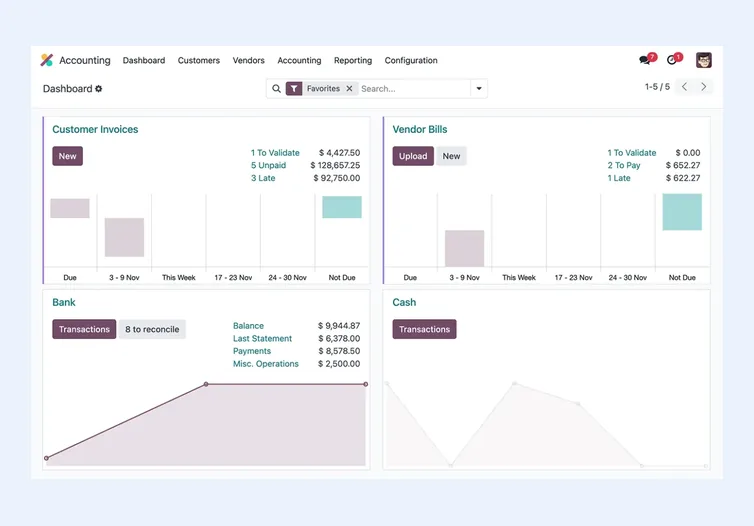
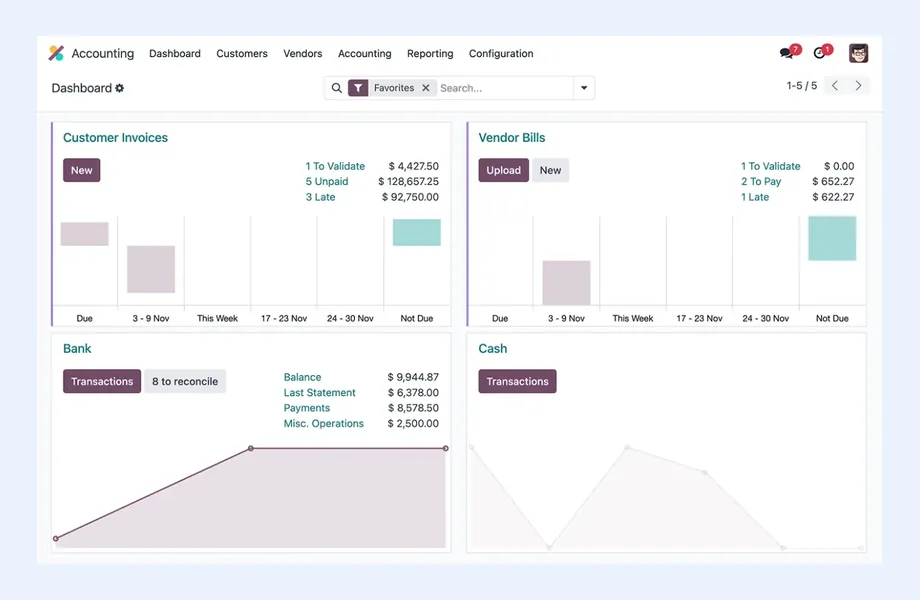
Community gives you invoicing, while analytic reporting, bank feeds and the complete Accounting app usually come with Enterprise; check the current list before you plan. The multi-company ERP page expands on entity design.
Canadian migrations into Odoo Accounting usually start from Sage or QuickBooks, occasionally Acomba in Quebec. I load balances and open items, not full history, and cut over at a period end that suits your filing frequency. Items needing care:
Each load is reconciled against old system reports. ERP data migration describes the sign-offs.
Odoo Accounting is not enough when payroll must sit inside the ERP with full Canadian source deductions and year-end slips, when audit-grade consolidation across many entities is central, or when accounting is the only need and a dedicated package does it well. The Odoo Accounting vs QuickBooks comparison and Business Central in Canada are the usual alternatives I lay out. For hosting, bilingual documents and implementers, see Odoo in Canada; for product detail, Odoo Accounting; for my wider Canadian work, ERP consultant Canada and the Canada hub.

Tell me about your business and current systems. I’ll suggest the most sensible first step.
Book a Consultation
Not sure which ERP you need?
Share your business requirements with me and I will help you understand the right process, architecture and platform before implementation.
FAQ
Odoo does not force a GIFI mapping, but you can design the chart so each account corresponds to one GIFI item and record the code on the account, using tags or a field depending on your version. Your accountant then maps the trial balance quickly at year end. I agree the mapping with them during design.
Odoo's Canadian localization provides tax reporting driven by tax grids. Whether it presents separate federal and Quebec reports or a combined view depends on your version. I compare the output with the returns your accountant files and add filtered reports or exports where needed.
Non-recoverable PST should be added to the cost of the item or expense rather than held as a recoverable tax. Recent Odoo versions have better support for non-deductible tax portions. I check how your version behaves and configure PST on purchases so it lands in cost accounts.
Yes. Odoo can revalue open foreign currency receivables, payables and bank balances, posting unrealized exchange differences that reverse in the next period. I agree the rate source and timing with your controller and make sure realized and unrealized differences go to separate accounts.
Yes. I work remotely and plan live sessions around your head office time zone, from Pacific to Atlantic. Your accountant joins the return grid review and opening balance sign-off, and recorded sessions let staff in other provinces catch up.
Every business is different. Share where you are today and what you want to fix, and I’ll tell you honestly whether and how I can help.
Book a Consultation
Insights
 Book a Consultation
Book a consultation to talk through your processes, systems and goals. I’ll reply with practical next steps - no obligation.