Contact Info

Zoho CRM or HubSpot CRM: which is better?
It depends on your sales process and who will run the CRM. Zoho CRM is highly configurable, with guided processes, territories and scripting, and suits teams with complex or regulated sales steps. HubSpot CRM is easier to adopt and closely tied to marketing, and suits teams that value speed and usability. Process complexity, admin capacity and how cost scales with seats decide it.
| Criteria | Zoho CRM | HubSpot CRM |
|---|---|---|
| Best use cases | Structured B2B sales, dealer or channel sales, and processes with approvals and compliance steps | Inbound-led sales where reps follow up marketing leads through a clear pipeline |
| Company size | Small to mid-sized sales teams, including multi-team and multi-territory organizations | Startups to mid-sized teams, scaling up through Sales Hub tiers |
| Industry fit | Manufacturing sales, distribution, real estate, education, financial services and services | SaaS, technology, agencies, professional services and other marketing-driven sellers |
| Customization | Custom modules, fields, layouts, Blueprint, validation rules and Deluge functions | Custom properties and pipelines; custom objects and coded actions in higher tiers |
| Pricing model | Per user per month by edition, also included in Zoho One | Free CRM tools, then paid Sales Hub seats by tier |
| Scalability | Handles complex structures, roles and territories well as teams grow | Scales smoothly for standard pipelines; complex structures need higher tiers |
| Implementation complexity | Moderate; more design decisions up front, but very adaptable afterward | Low for standard setups; rises with custom objects and integrations |
| Integrations | Native Zoho apps, Zoho Flow, REST APIs and a marketplace | Large app marketplace, native email and calendar sync, REST APIs |
| CRM | Deep configuration for leads, deals, accounts, quotes and custom records | Contacts, companies, deals and tickets with strong activity timelines |
| Automation | Workflow rules, Blueprint, assignment rules, approvals and Deluge | Visual workflows and sequences, more advanced in higher tiers |
| Reporting | Standard reports and dashboards, with Zoho Analytics for deeper analysis | Clear dashboards and forecasting, with custom reporting in higher tiers |

I compare platforms against your real processes with scripted demos and weighted scoring - independent of any vendor.
Get an Independent ERP Assessment
 Strengths & Limitations
Zoho CRM
Best for: Sales teams with structured or complex processes, such as approvals, territories, multiple pipelines and custom modules, that want deep configuration and scripting without enterprise CRM overhead.
Strengths
Limitations
HubSpot CRM
Best for: Sales teams that work closely with marketing, want a clean interface and fast adoption, and run a relatively standard pipeline from lead to closed deal.
Strengths
Limitations
This page compares the two CRMs for a sales team. If you are weighing the wider suites, including marketing hubs, finance and operations, see Zoho vs HubSpot.
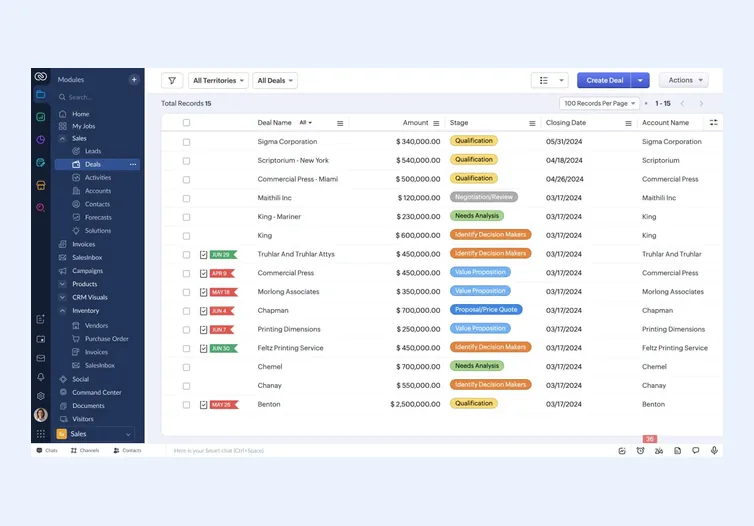
Zoho CRM is built for configurability. You can create custom modules, enforce process steps with Blueprint, route records with assignment and territory rules, and extend almost anything with Deluge. It suits sales processes that have real structure: approvals on discounts, mandatory documents before a stage change, dealer networks or several business units.
HubSpot CRM is built for adoption. Reps get a clean timeline of every email, call, meeting and marketing touch, with sequences and tracking built in. It suits teams where speed and visibility matter more than enforcing a strict process. The trade-off is that deeper customization and advanced sales features sit in higher paid tiers.
Choose Zoho CRM when the sales process must be enforced, not just recorded; when you need custom modules for things like projects, sites or contracts; or when the CRM must connect natively to Zoho Books for quotes and invoices.
Choose HubSpot CRM when most leads come from marketing, the team values ease of use above configurability, and the pipeline is relatively standard. It is also a natural fit when the marketing team already runs on HubSpot.
Whichever you pick, a CRM only works when its data model matches how you actually sell. I describe that design work in CRM consulting, and the rollout steps in my Zoho CRM implementation guide.
For a CRM switch, map objects, fields, picklists, pipelines and stages before exporting anything, and clean duplicates in the source system first. Decide how much email and activity history you really need; carrying everything often adds clutter without value.
Owners, teams and permissions should be set up before import so records land with the right people. Rebuild automation rather than copying it, and remove rules that no longer serve the process. Keep the old CRM read-only for a short period and reconcile pipeline totals between the two before switching off.
I am an independent consultant, so I do not earn anything from the platform you pick. I start with the business, not the software: how leads arrive, how deals move through each stage, who approves what, and which requirements genuinely decide the outcome. Those requirements become a weighted scoring sheet, and every shortlisted option is scored against the same list.
Through my vendor selection work I run scripted demos built around your real scenarios, so vendors show your process rather than their best slides. Through ERP evaluation I review proposals, implementation plans and the fine print on licensing, add-ons and support. You end up with a written recommendation, the reasoning behind it and the risks to manage, whichever option wins.
Not sure which ERP you need?
Share your business requirements with me and I will help you understand the right process, architecture and platform before implementation.
FAQ
For end users the difference is smaller than people expect, but HubSpot is generally simpler out of the box. Zoho CRM has more configuration options, so administrators face a steeper learning curve. A well-designed Zoho CRM layout can be just as easy for reps to use.
HubSpot offers free CRM tools with core contact, company and deal management. Many sales teams later need paid Sales Hub features such as advanced automation, forecasting or custom reporting. Map your requirements to the tier that actually covers them before deciding.
Zoho CRM usually handles complex, enforced processes more naturally through Blueprint, approvals, custom modules and Deluge. HubSpot can support complex setups in its higher tiers, but it is designed first for clarity and speed rather than strict process control. Map your process steps to each before deciding.
Yes. Some teams keep HubSpot for marketing and use Zoho CRM for sales, connected through an integration. Agree on which system owns contacts, lifecycle stages and consent, otherwise the two systems will overwrite each other. Test the integration with real records before go-live.
Every business is different. Share where you are today and what you want to fix, and I’ll tell you honestly whether and how I can help.
Book a Consultation
Insights
 Book a Consultation
Book a consultation to talk through your processes, systems and goals. I’ll reply with practical next steps - no obligation.